Climate
Forecasts
View, filter and publish seasonal, downscaled, weekly and daily forecast files.
Climate → Forecasts holds the forecast PDFs synced from the climate API. Everyone can view and download them; climate.admin users can also publish new ones.
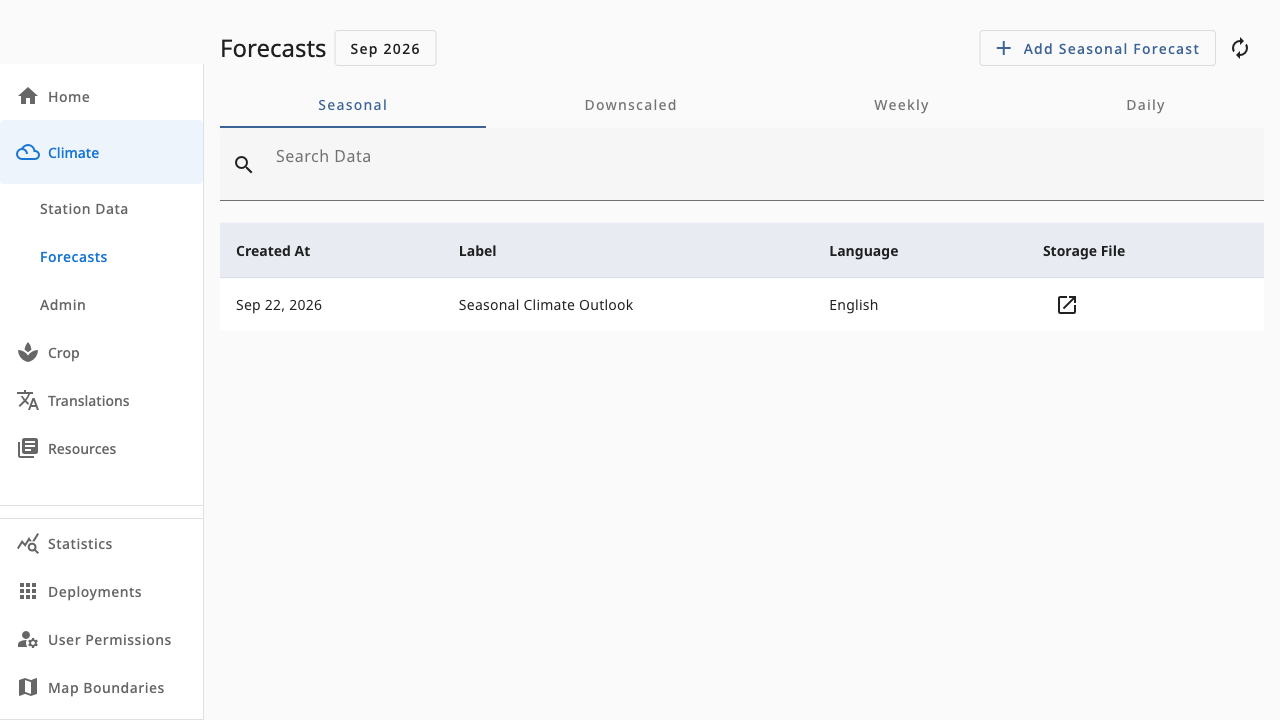 1234
1234- 1Month picker — scopes the list to forecasts issued in that month
- 2Add Forecast (climate.admin) — upload a new PDF for the selected type
- 3Type tabs — Seasonal, Downscaled, Weekly and Daily
- 4Forecast table — issued date, label, language and file link
Browsing forecasts
- Pick a month to list only forecasts issued in that month.
- Switch between Seasonal, Downscaled, Weekly and Daily tabs.
- Click a row's file icon to open or download the PDF. Missing files are fetched automatically from the climate API.
Publishing a forecast (admin)
Add Forecast opens a form where you upload the PDF, set its label (usually the season or date range), choose the language, and — for downscaled forecasts — pick the location it applies to. The file is stored in your deployment's country storage bucket and recorded in the forecasts table.
Downscaled forecasts require a location; seasonal, weekly and daily forecasts do not. The form guesses the location from the filename when it can.