Climate
Climate data admin
Quality-check station data and compare it with the data bundled in the app.
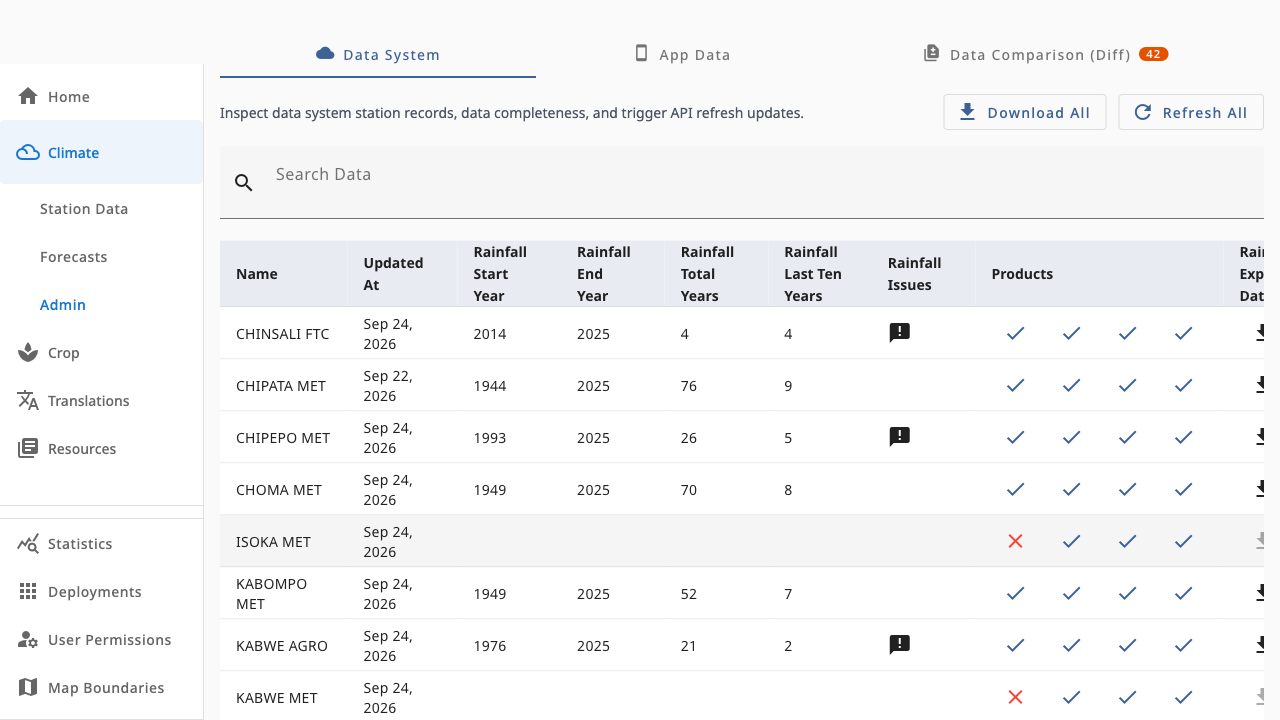
Climate → Admin (requires climate.admin) is the quality-control desk for climate data. It answers two questions: is the data-system data healthy? and does the field app have the same data?
 1234
1234- 1Download All — export every station summary as a zip of CSVs
- 2Refresh All — re-fetch all stations from the climate API
- 3Per-station products — ticks show which of the four summaries exist; click to refresh one station
- 4Rainfall issues flag stations with very short or patchy records
The three tabs
- Data System — every station with its data products (annual rainfall, crop probabilities, annual and monthly temperatures), rainfall issue flags (for example very short records) and per-row download.
Refresh Allre-fetches everything with a progress counter. - App Data — what is currently bundled with the field app (
Bundled/Missingper station, year ranges, available products). This is what farmers actually see. - Data Comparison (Diff) — compares the two: totals in sync vs divergent, stations only on one side, added/missing years and value differences. Open a row's preview to see exactly what changed before releasing a new app bundle.
Typical workflow
Refresh All(or refresh a single station) in Data System.- Check rainfall issues and failed product icons.
- Open Data Comparison and resolve divergences until stations show In Sync.
- Regenerate the app bundle so the field app picks up the verified data.
Refreshing re-fetches summaries from the climate API and can take a while for large station lists — the counter shows progress.