Translations
Translating app text
Find untranslated strings for your language and translate them.
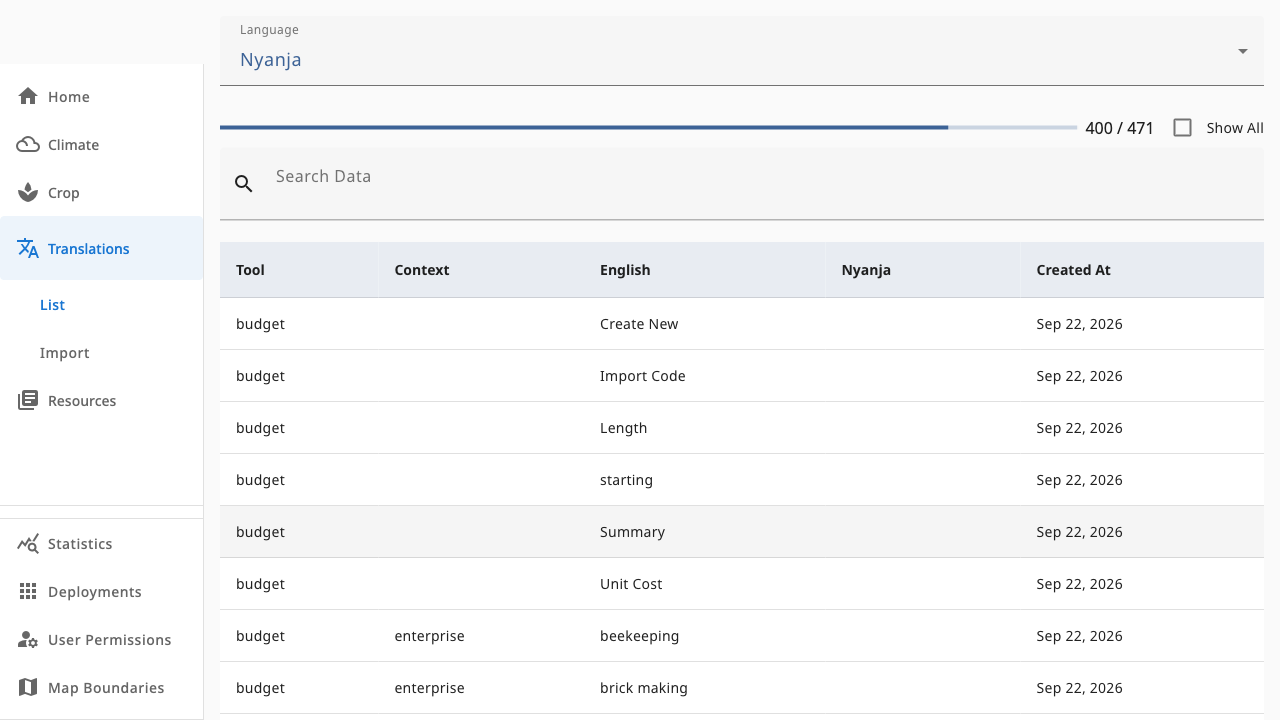
Translations → List shows every translatable string for your deployment's country. Pick a language to see what still needs translation.
 1234
- 1Language picker — the language you are translating into (e.g. Nyanja)
- 2Filter chips — Total, Translated or Needs Translation; pick one to narrow the table
- 3Search — find specific source text
- 4Translation table — tool, context, English source and your translation; click a row to edit
Workflow
- Select the locale — the list refreshes automatically.
- Work through rows with an empty translation cell. The Tool and Context columns tell you where the string appears; the funnel filter in the Tool header narrows the table to one tool.
- Click a row to open the editor dialog (
translations/edit/:id, requirestranslations.editor), enter the translation and save. - Pick the Needs Translation chip when you want to focus only on rows still missing a translation.
A progress indicator tracks how much of the locale is complete.
Who can do what
EveryoneBrowse strings, pick a locale, filter by translation state and track progress.
EditorClick any row to translate it in the editor dialog (
translations.editor).